

Fortigate: How to know the data usage in one interface

Mar 18, 2024 | Fortinet, Fortigate

Sometimes it is interesting to know the amount of data that has been transmitted on a firewall interface, for example when using a 4G/5G modem which has a data plan restricted to a specific amount.

In FortiOS, there is an undocumented CLI command called fnsysctl, this command allows you to run FortiOS Linux kernel utilities in read-only mode.

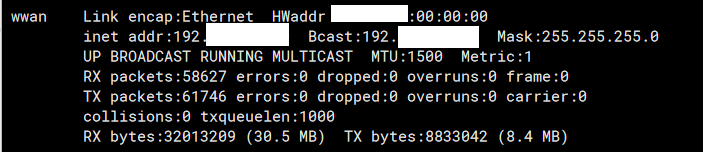
To find out the amount of Gb of data transmitted on an interface since the Fortigate Firewall was started, we will use the ifconfig utility.

By executing the command as follows: fnsysctl ifconfig
fnsysctl ifconfig

fnsysctl ifconfig


 After executing it we will see the data usage ( Upload and Download) indicate in bypes and also MB or GB between in parentheses.




Explore More Insights

Fortios 7.6: The end of the SSLVPN era

After years of Fortinet’s SSLVPN solution on the market, which featured high performance and the use of TLS . Fortinet has announced the following in the FortiOS 7.6 release notes Models with less than 2Gb of RAM will not support SSLVPN in FortiOS 7.6. The…

Read More

FortiSASE Expands with New Ireland POP

At Pablosec, as a proud Fortinet partner, we are thrilled to share some excellent news from the Fortinet ecosystem. Just a couple of months after Fortinet was recognized as a Leader in the Gartner® Magic Quadrant™ for Security Service Edge (SASE), a new milestone has…

Read More